Important Notice

This blog has been moved! Visit the new location at https://medium.com/@arunpatidar26/list/aem-dbc5a3e4df7c.
Showing posts with label osgi. Show all posts

AEM - Restricting CRXDE Access for few users

In AEM, CRXDE access can be disabled by
 1. Disabling the required bundles 
  • Adobe CRXDE Support (com.adobe.granite.crxde-support)
  • Adobe Granite CRX Explorer (com.adobe.granite.crx-explorer)
  • Adobe Granite CRXDE Lite (com.adobe.granite.crxde-lite)


What if CRXDX needs to be disabled/restricted for a few users/groups.

One of the solutions could be to check the user when the user attempts to access CRXDE and block the access or re-route.

Step to Implement the above approach :

1. Create a Sling Filter to check the CRXDE access request.
2. Create an OSGi configuration and service to maintain restriction data(Users, groups, excluded user)
3. Create a clientlibs to re-route the user to another page while accessing CRXDE.

In the Sling Filter get the current user and check against service configuration and if found then replace/redirect one of the existing js to our custom clientlibs js.
Custom clientlibs will then take care of blocking CRXDE.


OSGi Configuration


Custom Clientlibs
Create a clientlibs with redirection code 

window.location="/aem/start.html"


AEM - Retry Failed Workflow Item using Curl and Java

In AEM, workflows instances can be managed (complete, send back, terminate etc) either from AEM inbox or from workflow console.

AEM Inbox
http://localhost:4502/aem/inbox

AEM Workflow - Instance Page
http://localhost:4502/libs/cq/workflow/admin/console/content/instances.html

Sometimes there are cases when workflows need to manage programmatically. This can be done using various AEM workflow JAVA API, available within below packages.

Granite API

com.adobe.granite.workflow
com.adobe.granite.workflow.model
com.adobe.granite.workflow.exec

CQ API (old)

com.day.cq.workflow
com.day.cq.workflow.model
com.day.cq.workflow.exec

But None of the API have option to retry failed workflow.

AEM inbox


The alternative is to create a custom solution to retry workflow


Retry Workflow using Curl

WORKFLOW_ITEM_ENCODED="$(uriencode ${WORKFLOW_ITEM})"

curl -u admin:admin \
-H 'Content-Type: application/x-www-form-urlencoded; charset=UTF-8' \
--data "cmd=advance" \
--data "item=${WORKFLOW_ITEM_ENCODED}" \
--data "route-${WORKFLOW_ITEM_ENCODED}=retry-current-step" \
--data "comment-${WORKFLOW_ITEM_ENCODED}=retry by curl"


where ${WORKFLOW_ITEM} variable contains the current workflow item path.
e.g.
/var/workflow/instances/server0/2019-07-28/request_copy_2/workItems/node1_var_workflow_instances_server0_2019-07-28_request_copy_2


Complete Curl code at
https://github.com/arunpatidar02/aem63app-repo/blob/master/java/workflow/retry-wf.sh


Retry Workflow using JAVA

In code, you may need to retry workflow from a servlet or any other services or components.
I created an OSGi component, which provides methods to retry a failed workflow item.
You need to add below code files available from GitHub
https://github.com/arunpatidar02/aem63app-repo/tree/master/java/workflow/com/acc/aem64/core/services


This WorkflowRetryService interface contains 2 methods

public void retryWorkflow(WorkflowSession wfSession, WorkItem workflowItem, Map<String, String> param);

public void retryWorkflow(String workflowItemPath, Map<String, String> param);

Where,
wfSession: WorkflowSession from the current session
workflowItemPath: Current item path as shown in the above screenshot
workflowItem: Current workflow item of the above path
param: Map, contains workflow item's metadata properties in key-value pair like comment etc.


The second method uses the sub-service session, so make sure service user has rights to perform read/write and other operation in the repository.


Example Servlet

This servlet is used to retry workflow using Java

String workflowItemPath = "/var/workflow/instances/server0/2019-07-28/request_copy_2/workItems/node1_var_workflow_instances_server0_2019-07-28_request_copy_2";
Map<String, String> params = new HashMap<String, String>();
params.put("comment", "comment - retrying");
WorkflowSession wfSession = (WorkflowSession)req.getResourceResolver().adaptTo(WorkflowSession.class);
WorkItem workflowItem;
try {
  workflowItem = wfSession.getWorkItem(workflowItemPath);
  wrs.retryWorkflow(wfSession, workflowItem, params);
//  wrs.retryWorkflow(workflowItemPath, params);
} 
catch (WorkflowException e) {
  e.printStackTrace();
}

https://github.com/arunpatidar02/aem63app-repo/blob/master/java/WorkflowRetryDemoServlet.java


AEM - Create OSGI Configuration Factory Service using R6 annotations

This article shows how to create OSGI Configuration Factory Service using OSGi R6 annotations.

OSGi Factory Service

Declaring the Service interface

public interface FileService {
public String getFileData();
}

Declaring the Service Configuration

@ObjectClassDefinition(name = "File Factory Service Configuration", description = "Factory Service Configurations")
public @interface FileServiceFactoryConfig {

@AttributeDefinition(name = "filetype", description = "File Type", type = AttributeType.STRING)
String file_type() default "xml";

@AttributeDefinition(name = "size", description = "Max Size of file(KB)", type = AttributeType.LONG)
long max_size() default 10240L;

}

Service implementation

@Component(service = FileService.class, immediate = true)
@Designate(ocd = FileServiceFactoryConfig.class, factory=true)

public class FileServiceImpl implements FileService {
private String data;

@Override
public String getFileData() {
return "File data from Service:" + this.data;
}

@Activate
@Modified
protected void activate(final FileServiceFactoryConfig Config) {
this.data = PropertiesUtil.toString(Config.file_type() + " - " + Config.max_size(), "No Config found");
}
}


In the above code, the @Designate annotation has "factory=true" which makes this config as a factory.

Now Let’s create two service configurations from the factory which can be consumed by a test servlet that we are going to write next.


Configuration 1:

config 1


Configuration 2:

config 2


factory config

Sling Servlet

@Component(service = Servlet.class, property = { Constants.SERVICE_DESCRIPTION + "=Demo Servlet to access factory configs",
"sling.servlet.methods=" + HttpConstants.METHOD_GET, "sling.servlet.paths=" + "/bin/demo/facttest" })
public class FactConfigTestServlet extends SlingSafeMethodsServlet {

private static final long serialVersionUID = 2598426539166789516L;

@Reference(target="(file.type=xml)")
FileService fs1;

@Reference(target="(file.type=pdf)")
FileService fs2;


@Override
protected void doGet(final SlingHttpServletRequest req, final SlingHttpServletResponse resp)
throws ServerException, IOException {
try {
resp.setContentType("text/html");
resp.getWriter().write("<br>"+fs1.getFileData());
resp.getWriter().write("<br>"+fs2.getFileData());
resp.getWriter().close();
} catch (Exception e) {
e.printStackTrace();
}
}
}


This Reference with target parameter will directly points to the service which has the file.type as xml
@Reference(target="(file.type=xml)")
FileService fs1;

@Reference(target="(file.type=pdf)")
FileService fs2;


Call this servlet by using http://localhost:4502/bin/demo/facttest
which should return the configuration data based on target attribute of Reference annotations

Output


servlet output


Note: Without the target attribute i.e. only with a @Reference annotation the data binding will be random, more info at  https://osgi.org/javadoc/r6/cmpn/org/osgi/service/component/annotations/Reference.html

Code

Code used in this article can be found at GitHub
https://github.com/arunpatidar02/aem63app-repo/tree/master/java/r6/factory


AEM - Get JSON response of an AEM Page

Creating a Default servlet with a selector to get Page JSON Response

For the demo, I created a 'hcms' Selector to get Page JSON Response, when the request is made using 'hcms' selector the node would be converted into json and json response would be returned, it is like OOTB 'model' selector but with extension
  • Allow renaming properties
  • filter results(exclude properties based on config)
  • include reference response e.g. experience fragments

Uses

URL - http://host:port/resourcepath.hcms.json 

Examples :
http://localhost:4504/content/we-retail/language-masters/en/men.hcms.json
http://localhost:4504/content/experience-fragments/demoxf/demoxf.hcms.json

with tidy selector
http://localhost:4504/content/experience-fragments/demoxf/demoxf.hcms.tidy.json


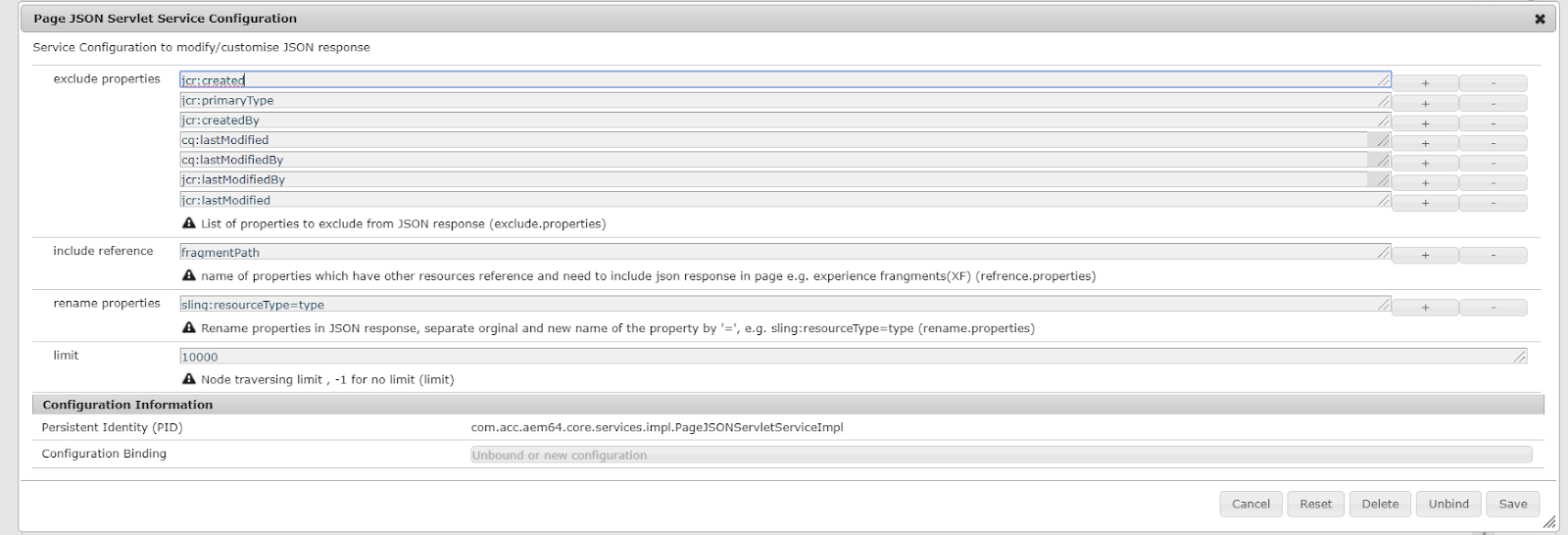
OSGi Config

  • exclude properties: list of properties to be excluded from JSON response
  • include references: a list of properties that specify the reference of another resource.
  • rename properties: list of property to rename if response, e.g. originalname=newname
  • limit: to restrict look up if there is an infinite loop due to reference inclusion or the number of child nodes more than expected.


JSON Output

JSON output contains an array of node representations of JSON objects.
Each node object has the name, properties and childnodes items(properties).

The json object would not have properties or childnodes items if they are empty, That's means if the node doesn't contain any property(filtered) then there will be no properties item in json response and if there is no child node of a node then childnodes items will be not there in the response)

json representation of experience fragment :

{
  "name": "jcr:content",
  "properties": {
    "cq:tags": [],
    "jcr:title": "demoXF",
    "cq:xfVariantType": "web",
    "type": "weretail/components/structure/xfpage",
    "cq:template": "/conf/we-retail/settings/wcm/templates/experience-fragment-web-variation",
    "cq:xfMasterVariation": true
  },
  "childnodes": [
    {
      "name": "root",
      "properties": {
        "type": "wcm/foundation/components/responsivegrid"
      },
      "childnodes": [
        {
          "name": "product_grid",
          "properties": {
            "tagsMatch": "any",
            "pages": [
              "/content/we-retail/language-masters/en/products/men/shirts/eton-short-sleeve-shirt",
              "/content/we-retail/language-masters/en/products/men/pants/trail-model-pants",
              "/content/we-retail/language-masters/en/products/men/shorts/pipeline-board-shorts",
              "/content/we-retail/language-masters/en/products/men/shirts/amsterdam-short-sleeve-travel-shirt",
              "/content/we-retail/language-masters/en/products/men/shorts/buffalo-plaid-shorts",
              "/content/we-retail/language-masters/en/products/men/coats/portland-hooded-jacket"
            ],
            "feedEnabled": true,
            "displayAs": "products",
            "listFrom": "static",
            "limit": "6",
            "orderBy": "jcr:title",
            "type": "weretail/components/content/productgrid",
            "pageMax": "0"
          }
        },
        {
          "name": "image",
          "properties": {
            "isDecorative": "false",
            "altValueFromDAM": "true",
            "titleValueFromDAM": "true",
            "fileReference": "/content/dam/core-components-examples/library/sample-assets/mini.jpg",
            "displayPopupTitle": "true",
            "type": "weretail/components/content/image"
          }
        }
      ]
    }
  ]
}     

POM Gson dependency

<dependency>
<groupId>com.google.code.gson</groupId>
<artifactId>gson</artifactId>
<version>2.8.5</version>
</dependency>

AEM - Touch UI dropdown from JSON file/Servlet

Populate Touch UI Dropdown options from JSON file or Servlet which returns JSON

In AEM classic UI, the selection/dropdown widget's options can be populated using JSON response(via JSON file or servlet) but in Touch UI, you need to write a piece of code to achieve same. This blog is about a utility which populates dropdown options dynamically from a JSON file which presents in the repository or from the servlet JSON response.

Custom Utility to populate a dropdown

This custom java utility populates touch UI dropdown from JSON data.

Steps are as follows:

  1. Create a dropdown using granite/coral select type and create datasource node under the select node.
  2. Add following properties to datasource node : 
    - options (String) - path of json file or Servlet, which returns json examples : 
      /apps/commons/utils/json/dropdown/color.json   /bin/utils/json/dropdown/style - sling:resourceType (String) - utils/granite/components/select/datasource/json- repoSource (Boolean) - optional property to specify file in repository or servlet json source. 
    • true(Default) : to read JSON file stored in repository   
    • false : to get JSON from another Servlet

if repoSource property is true JSON file will be read using Node API, if false then another HTTP call is to be made to get JSON response either from json file or servlet. 
if repoSource is false it works in both cases in file or servlet JSON response. This property is just added to avoid unnecessary HTTP call if the file is in the repository.


datasource node properties


    You can find the example that explains how to use datasource with to populate touch UI dropdown at https://helpx.adobe.com/experience-manager/using/creating-granite-datasource.html

    Utility Servlet code
    https://github.com/arunpatidar02/aem63app-repo/blob/master/java/dropdown/PopulateTouchUIDropdownFromJsonResource.java


    POM file changes
    Add below dependencies in parent and core pom(if not already added) 

    1. GSON
     <dependency>
      <groupId>com.google.code.gson</groupId> 
      <artifactId>gson</artifactId>
           <version>2.8.5</version>
     </dependency>

     2. HTTP Client 
      <dependency>
          <groupId>org.apache.httpcomponents</groupId>
          <artifactId>httpclient</artifactId>
          <version>4.5.5</version> 
     </dependency>


    Example JSON file/response
    The Josn response can have array of options in below formates:
    {"text": "White","value": "white"}
    {"text": "White","value": "white","disabled": true} - to disable option in dropdown
    {"text": "White","value": "white","selected": true} - to preselect option in dropdown


    Example file -
    https://github.com/arunpatidar02/aem63app-repo/blob/master/java/dropdown/sample.json


    Conclusion

    This utility can be used to render any touch UI dropdown options from json source similar to classic UI. This Utility uses GSON to parse JSON and create options. If you are looking for same using JSONObject API, you can check example at https://github.com/arunpatidar02/aem63app-repo/blob/master/java/DatasourceJson.java

    AEM - Custom Template'd Email

    AEM provides OOTB email templates to send emails for workflow notification, completion, etc.
    But those templates are plain text and cannot provide rich UI and limited to few dynamic properties.
    Example - OOTB workflow notification email template contains plain text and other variables like an event, workitem, user, host properties, etc.

    More info about Email Templates for Workflow Notification at https://helpx.adobe.com/experience-manager/6-3/sites/administering/using/notification.html#ConfiguringtheWorkflowEmailNotificationService


    Custom Email

    Custom Email Service/Servlet/Process Step:

    You can create a utility/Servlet/workflow Process, whichever trigger the email and use com.day.cq.mailer.MessageGatewayService to send template based email.

    Add Below dependencies in POM. or check dependencies using dependency finder at http://localhost:4504/system/console/depfinder
    Pom dependencies
    Create a utility class, In this class inject MessageGatewayService service using Reference annotation and Create a map with all the dynamic properties.

    e.g.

    @Reference
    private MessageGatewayService messageGatewayService;

    final Map<String, String> parameters = new HashMap<String, String>();
    parameters.put("title", "Demo Email");

    Create org.apache.commons.mail.HtmlEmail class object with template and map parameters.

    HtmlEmail email = mailTemplate.getEmail(StrLookup.mapLookup(parameters), HtmlEmail.class);

    Find the below Servlet Example for complete code -
    https://github.com/arunpatidar02/aem63app-repo/blob/master/java/email/HTMLEmailServlet.java


    Custom Email template.txt

    You can create a custom HTML5 template like an HTML page and save it as .txt in CRX repository wherever you want.
    All the variable values can be replaced with properties set in the code e.g. ${title}

    Example template available at 
    https://github.com/arunpatidar02/aem63app-repo/blob/master/java/email/html5-template.txt


    OSGi Config to Send an email:

    For AEM to be able to send emails, the Day CQ Mail Service needs to be properly configured. Please check at
    https://helpx.adobe.com/experience-manager/6-3/sites/administering/using/notification.html#configmail

    Sample configuration for sending email using Gmail SMTP server


    That’s it. Find the sample email trigger by https://github.com/arunpatidar02/aem63app-repo/blob/master/java/email/HTMLEmailServlet.java servlet.


    Find the complete code used in this blog at Github.

    AEM - Osgi Config Dashboard

    Apache Felix framework provides restful APIs to access OSGi bundle info over regular HTML and JSON format. if requests are sent with the .json extension; e.g. .../bundles/id.json. or .../bundle.json the JSON response of bundle will be returned. more info available at https://felix.apache.org/documentation/subprojects/apache-felix-web-console/web-console-restful-api.html

    But for OSGi configs, there is no JSON API is available to fetch OSGi config as JSON response, though plain text representation of configuration can be seen at http://host:port/system/console/status-Configurations with web console access.


    OSGi Configuration API

    I created an API to return modified OSGi configurations as JSON response, available at https://github.com/arunpatidar02/osgi-config-api

    OSGi Config Dashboard

    I consume the above API and created a landing page in AEM, which shows the OSGi configs with filter and sorting options.
    Note : This zip package contains only nodes and UI code but doesn't contain OSGi bunndle(Servlet and other Java class). These java classes can be copied for github and use.

    Dashboard page url - http://host:port/osgiconfig

    Osgi Configuration Dashboard Page


    Filter

    Results can be filtered using text and/or repository based configurations.
    Text enter in 'Enter keyword' look for pid, factoryPid and Properties, if anyone of matches then result returns for that OSGi config.
    Filter dropdown had two options All and Repository based.
    if Repository based selected then all the repository based configs will be returned in the combination of text entered in 'Enter keyword' field otherwise all configs will be returned in the combination of text entered in 'Enter keyword' field.

    Note: Result filtering is taking place at the client side, there is no request sent to the server to fetch new results.
    OSGi configs only getting fetched once on page load and filtering/sorting is done at client side.


    Filter section


    Filtered Result - Repository based


    Filtered Result - keyword + Repository based


    Filtered Result - Keyword


    Sorting

    Results can be sorted either by pid or Repository based config.


    Properties

    When clicking on more info icon for OSGi config a popup will be shown which contains the following info:
    • Pid
    • factoryPid - if the config is a type of factory config
    • Change count
    • Repository Paths - if the config is repository based(sling: OsgiConfig)
    • Properties


    Conclusion

    This dashboard is an example of to consume API and can be used in non-prod instance to check OSGi configs if the users don't have access to the web console but the user should have read access at /apps, /conf and /libs (or alternatively sub-service session can be used in the servlet while executing query to fetch repository based config).

    AEM - Restrict Component Editing and Allowed Only for Certain Users


    Disable Component Editing via dialog except few users

    In AEM majorly content is created using component's dialog. Sometimes few type of contents is meant to be edited only by certain authors and are not suppose to modify or create by other authors.
    In this case how can we protect these type of components should not be updated by non-authorised users.

    In AEM when a component in a web page is rendered, an HTML element can be generated, wrapping the rendered component within itself. This primarily serves two purposes:

    • A component can only be edited when it is wrapped with an HTML element.
    • The wrapping element is used to apply HTML classes that provide:
      • layout information
      • styling information
    More info about Decoration Tag available at Decoration Tag
    If  cq:noDecoration {boolean}, This property added to a component and a true value forces AEM not to generate any wrapper elements over the component.This property set the decoration tag based on boolean value.
    But decoration property can also be set programatically, [JAVA API]


    In Java code if we check current user against the allowed group(s) and if user member of allowed group we will set decoration tag otherwise not.This will serve our purpose for this use case.


    JAVA Code

    package com.aem.community.core.models;

    import java.util.Iterator;

    import javax.annotation.PostConstruct;

    import org.apache.jackrabbit.api.security.user.Group;
    import org.apache.jackrabbit.api.security.user.User;
    import org.apache.sling.api.SlingHttpServletRequest;
    import org.apache.sling.api.resource.Resource;
    import org.apache.sling.models.annotations.DefaultInjectionStrategy;
    import org.apache.sling.models.annotations.Model;
    import org.apache.sling.models.annotations.injectorspecific.SlingObject;
    import org.slf4j.Logger;
    import org.slf4j.LoggerFactory;

    import com.day.cq.wcm.api.components.ComponentContext;
    import com.day.cq.wcm.commons.WCMUtils;

    @Model(adaptables = { SlingHttpServletRequest.class,
    Resource.class }, defaultInjectionStrategy = DefaultInjectionStrategy.OPTIONAL)
    public class DisableEditModel {

    Logger logger = LoggerFactory.getLogger(this.getClass());

    @SlingObject
    private SlingHttpServletRequest request;
    private final String GROUP ="my-approver";

    @PostConstruct
    protected void init() {
    try {
    boolean decoration=false;
    User currentUser = request.getResourceResolver().adaptTo(User.class);
    if(currentUser.isAdmin())
    return;
    Iterator<Group> currentUserGroups = currentUser.memberOf();

    while (currentUserGroups.hasNext()) {
    Group grp = (Group) currentUserGroups.next();
    if(grp.getID().equals(GROUP)) {
    decoration =true;
    return;
    }
    }

    ComponentContext cc = WCMUtils.getComponentContext(request);
    cc.setDecorate(decoration);
    } catch (Exception e) {
    // TODO Auto-generated catch block
    e.printStackTrace();
    logger.info(e.getMessage());
    }
    }

    }


    HTL Code

    <sly data-sly-use.disableEdit="com.aem.community.core.models.DisableEditModel"></sly>
    <div>Disabled Dialog Editing </div>